v0.7.0

VS Code Extension

Full language support for Satsuma: syntax highlighting, an LSP server with navigation and completions, real-time diagnostics, and interactive workspace visualization. All parser-backed.

242
LSP Tests
7
Commands
12
LSP Capabilities
3
Webview Panels

Full LSP, zero compromise

Every feature is backed by the tree-sitter parser. No regex heuristics, no guesswork — deterministic, correct results as you type.

Syntax Highlighting

TextMate grammar for immediate highlighting of all Satsuma constructs — keywords, types, metadata, strings, comments, and operators.

Semantic tokens from the LSP override TextMate scopes for context-sensitive constructs: source/target as keyword vs. field name, vocabulary tokens, and more.

Real-time Diagnostics

Parse errors — red squiggles as you type, powered by tree-sitter ERROR and MISSING nodes.

Semantic warnings — yellow squiggles on save via satsuma validate: undefined schemas, duplicate names, broken imports.

Marker comments//! warnings and //? questions surface in the Problems panel.

Navigation

Go-to-Definition (Ctrl+Click / F12) — jump to schema definitions, fragment blocks, imported definitions, and import file paths.

Find References (Shift+F12) — locate all usages of a schema, fragment, or transform across the workspace.

Rename Symbol (F2) — rename across all files with duplicate detection. Handles namespace-qualified references.

IntelliSense

Context-aware completions for every position:

  • Schema names in source / target blocks
  • Fragment and transform names after ...
  • Field names from source/target schemas in arrow paths
  • Metadata tokens: pk, pii, scd, required, etc.
  • Pipeline functions: trim, lowercase, coalesce, etc.
  • Block names in import { } declarations

Document Structure

Outline Panel — schemas, mappings, fragments, transforms, metrics, namespaces, and notes with nested fields.

Breadcrumbs — automatic navigation breadcrumbs from document symbols.

Code Folding — fold any block type: schema, mapping, fragment, transform, metric, note, namespace, each, flatten, map literal, metadata, nested arrow.

Hover — contextual info for blocks, fields, tags, spreads, arrow paths, and pipeline functions.

Format Document

Opinionated, zero-config formatting. One canonical style for all Satsuma files — field column alignment, consistent spacing, normalised blank lines.

Trigger with Shift+Alt+F or enable format-on-save. Same formatter as satsuma fmt in the CLI.

CodeLens

Inline annotations above every block, giving you at-a-glance structural insight:

schema N fields | used in M mappings
mapping source → target | N arrows
fragment spread in N places
transform used in N places
metric sources: schema1, schema2

7 commands at your fingertips

Access every command from the Command Palette (Ctrl+Shift+P). Each one integrates directly with the Satsuma CLI.

Validate Workspace

Run satsuma validate and populate the Problems panel with semantic errors.

Show Lineage From...

Pick a schema and trace its downstream data flow through the pipeline.

Show Warnings

Surface all //! warning comments in the Problems panel.

Show Workspace Summary

Display workspace statistics: schema count, mapping count, arrow count, and more.

Show Mapping Visualization

Open an interactive SVG diagram of your workspace with click-to-navigate nodes.

Trace Field Lineage

Open a visual multi-hop trace showing how a field flows from source to target.

Show Mapping Coverage

Gutter markers and status bar showing mapped vs. unmapped fields with coverage percentage.

Interactive visualization

Three dedicated webview panels bring your mapping workspace to life, right inside VS Code.

Workspace Graph

An interactive SVG diagram of your entire workspace, laid out by block type.

  • Schemas, mappings, metrics, and fragments as distinct node shapes
  • Click any node to jump to its definition
  • Namespace filter dropdown to focus on a single namespace
  • Auto-refreshes on file save

Field-Level Lineage

Trace a single field through the entire data pipeline with multi-hop chain visualization.

  • Horizontal flow: source.field → [transform] → target.field
  • NL transforms displayed with distinct styling
  • Click any node to navigate to the definition
  • Multi-hop chain tracing via satsuma arrows

Mapping Coverage

See at a glance which target fields are mapped and which are missing.

  • Green gutter markers for mapped fields
  • Red gutter markers for unmapped fields
  • Status bar shows coverage percentage
  • Works from cursor position inside any mapping block
Workspace Overview — schemas, mappings, and data flow at a glance
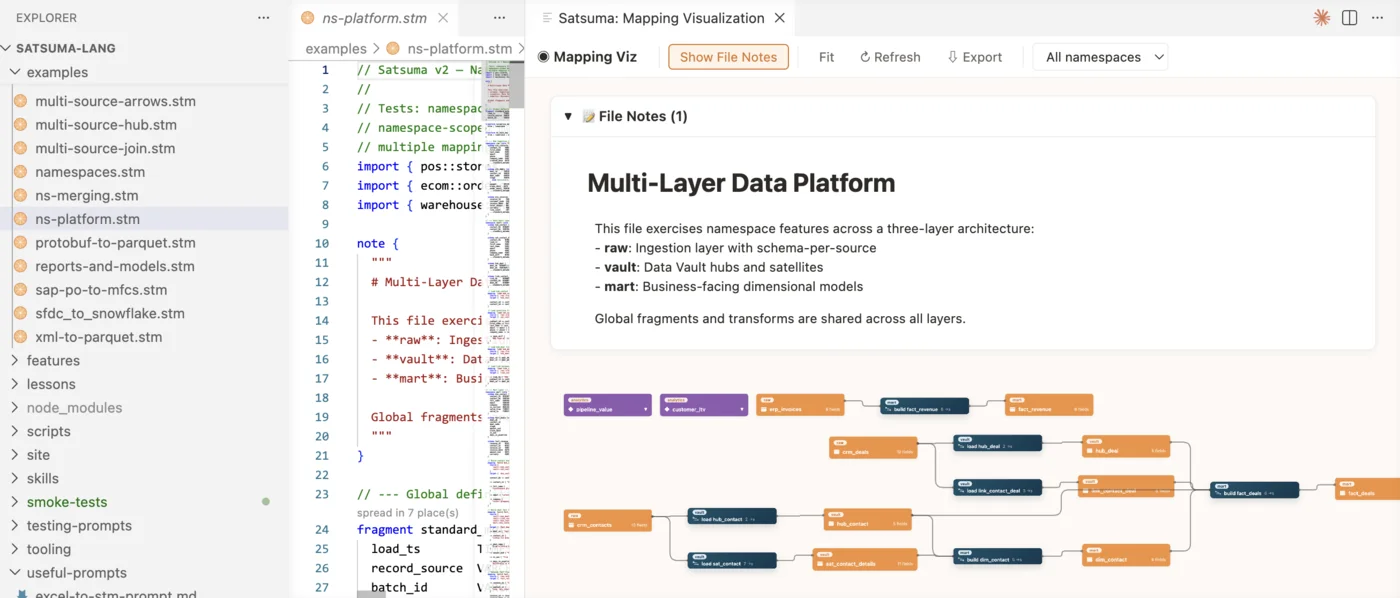
Satsuma VS Code extension workspace overview showing schema nodes connected by mapping arrows with namespace grouping
Mapping Detail — field-level arrows between source and target schemas
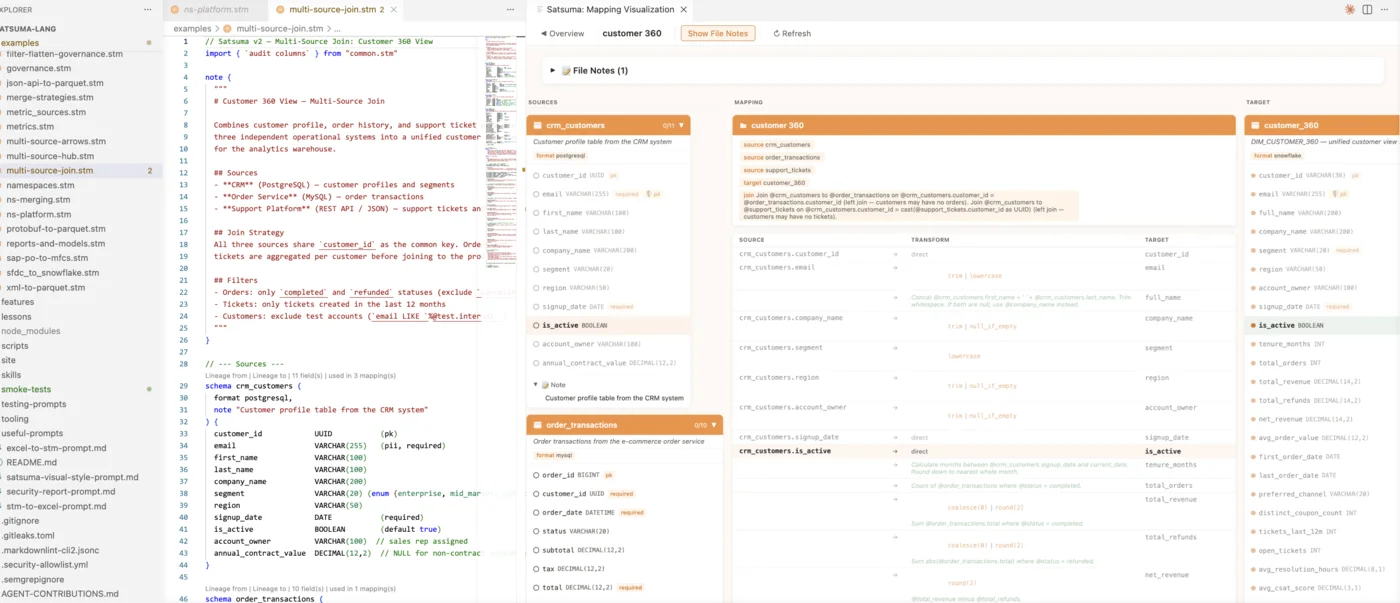
Satsuma VS Code extension mapping detail view showing source and target schema cards with field-level arrow connections

Get started in seconds

Download the extension, install it, and open any .stm file.

1

From GitHub Release

Recommended

Download vscode-satsuma-v0.7.0.vsix from the v0.7.0 release (or the latest unstable build), then install:

$ code --install-extension vscode-satsuma-v0.7.0.vsix
2

From Source

Clone the repo and build the extension yourself:

$ cd tooling/vscode-satsuma
$ npm install
$ cd server && npm install && cd ..
$ npm run build
$ npx @vscode/vsce package --no-dependencies -o vscode-satsuma.vsix
$ code --install-extension vscode-satsuma.vsix

Requirements

VS Code 1.85+

Required for the Language Server Protocol client and all extension features.

Node.js 20+

Needed only for building from source. Not required when installing the pre-built .vsix.

satsuma CLI on PATH

Required for validation diagnostics, workspace commands, and webview panels. Download from the v0.7.0 release or see the CLI page.

Configuration

If satsuma is not on your PATH, set the satsuma.cliPath setting in VS Code to the full path of the CLI executable.

Satsuma

Ready to simplify your data mappings?

Satsuma is open source and free. Start mapping in minutes.